
#1 What This State Means
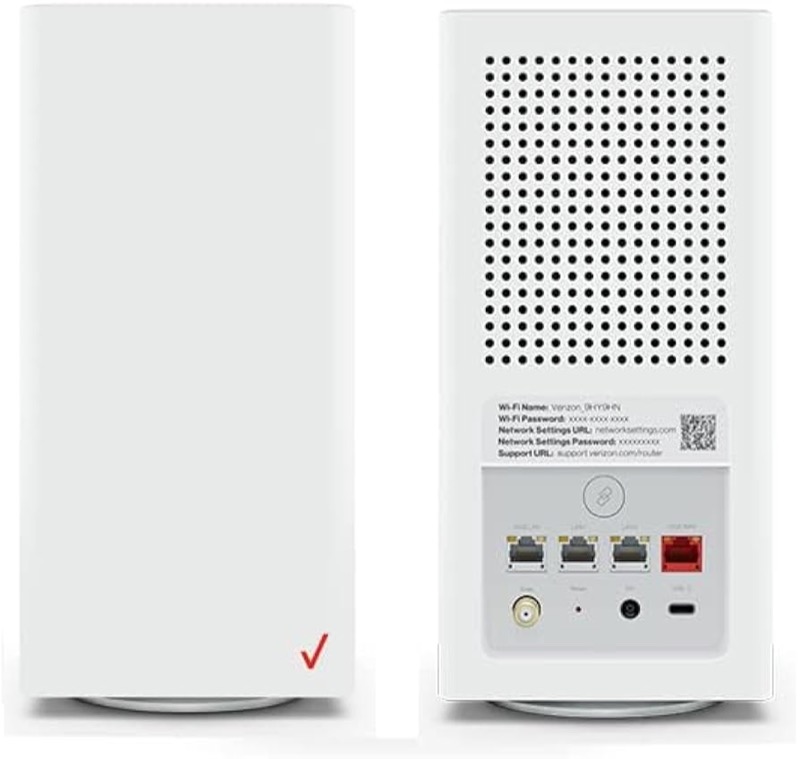
If your Verizon CR1000A has no light at all, the sources give one clear reading. The Verizon user guide (S08) lists the Power state on the Router Status chart as off, and its description is “Power off”. So a dark router is one that has no power, or is switched off. The first check is always the power, not the light.
The chart does not describe a dim light, a light that is on at the back, or an off light that comes on later without a fault. Verizon’s knowledge-base chart (S09) does not list an off state either. So the page does not claim more than the sources show: no light means the router is off, and the next step is to confirm the power supply before anything else.
The page covers the CR1000A only. The user guide’s chart is for that model, and the sources do not show that other Verizon routers share it.
#2 No light on the CR1000A
| What you see | What Verizon says | What to do |
|---|---|---|
| No light on the front | Power off | Check the power cord and outlet |
| Light comes on after you fix the power | The router is starting | Wait for fast blinking white to finish |
| Light is on but very faint | Not described in the chart | Check the power, then contact Verizon if it stays faint |
The user guide also describes the rear panel as having a DC power jack, so the power connection is at the back of the router. Check the jack as well as the outlet.
#3 Steps to Troubleshoot
- Confirm the router is dark. Look at the front light in normal room light, with the router switched on at the wall.
- Check the power cord at the router. Make sure the cord is fully pushed into the DC power jack on the back.
- Check the power cord at the outlet. Use a working outlet, and try another if you have one.
- Check the outlet’s switch, if it has one. A switched outlet or power strip can cut power without you noticing.
- Wait for the start-up when power returns. The chart says a router that is powered on starts with fast blinking white, so give it time to finish.
- If the router still shows no light with power connected, contact Verizon. Give the model, the power connection you checked, and whether the light ever comes on.
- Do not swap the power supply on your own. The sources do not describe a replacement, so confirm with Verizon before you buy one.
#4 What If Scenarios
Q: The router has no light but my internet works. Is that possible? The chart reads no light as the router being off, so internet working is not expected in that case. Check whether the router is actually switched on, or whether a light on another device is what you are seeing.
Q: I plugged the power in and the light is still off. What now? Check the cord at both ends, then try another outlet. If the router still shows no light with power connected, contact Verizon with the model.
Q: Does a reset bring the light back? The user guide does not describe a reset as the way to restore the light, and this page gives no reset duration, because only the user guide gives one. A reset removes your settings, so use it only if Verizon support asks you to.
Q: The light is off but the router is warm. Is it overheating? The chart does not connect an off light to overheating. Overheating is described for the red states, and the sources disagree on those, so contact Verizon rather than interpret the warmth alone.
Q: My router is a Fios Router G3100 or another model. Does this chart apply? Not as far as the sources show. This chart is for the CR1000A.
Q: The router has power but I cannot see a Wi-Fi name. Is that the same as no light? No. The chart does not show a separate Wi-Fi light. It shows solid green when Wi-Fi has been turned off by the user. So a router with a light on but no Wi-Fi name is in a different state from a dark router, and the check is the Wi-Fi setting rather than the power.
#5 Related Articles
For the full CR1000A chart, read the Verizon CR1000A light meanings guide. For the start-up state after power returns, read the Verizon router blinking white guide. For the solid white state, read the Verizon router solid white guide.