
#1 What This State Means
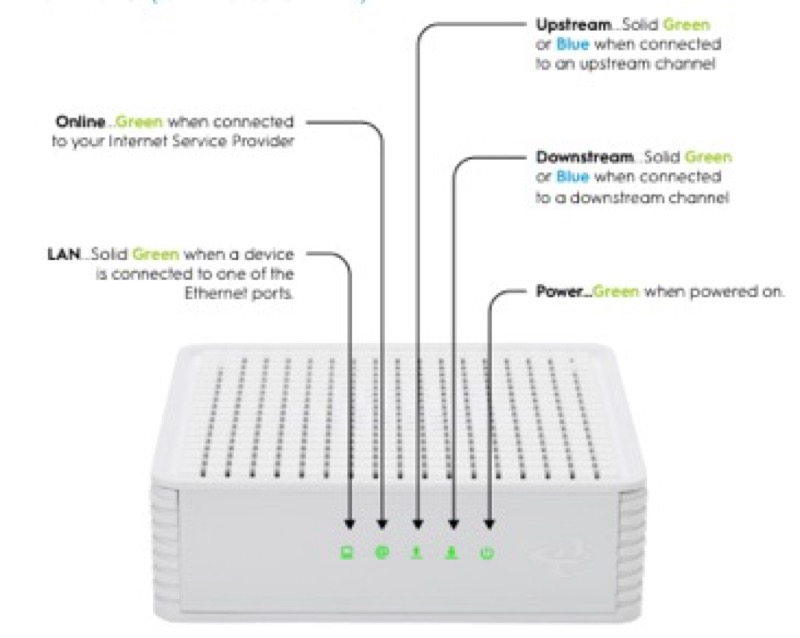
A light that stays wrong, or a router that loses the internet, can be caused by an outage in your area. The sources on this site do not give one outage tool for every provider. They name the tool each provider uses, and the page below follows those names rather than inventing a general one. An outage stops the connection, so the lights and the internet can be wrong at the same time, and checking for an outage is the step that separates a local fault from a network problem.
For AT&T, the BGW320 light guide (S06) tells you to check for a service outage in your area using Smart Home Manager or myAT&T on a mobile device. For Verizon, the Fios ONT page (S27) points you to the Guided Solutions Tool for service-line and equipment problems. For Spectrum, the modem-light page (S03) describes the signals an outage shows: Cable Link goes off when there is no cable connectivity, and the US and DS lights are on only when the internet is available. So for a Spectrum modem, the lights themselves give you the outage evidence.
The sources do not name an outage tool for Xfinity, Cox or NETGEAR on this page, so for those, contact the provider or check its official app or site for an outage.
#2 Outage checks by provider
| Provider | The tool the sources name | What it tells you |
|---|---|---|
| AT&T | Smart Home Manager or myAT&T on a mobile device | Whether there is a service outage in your area |
| Verizon | The Guided Solutions Tool | Issues with the equipment or service line |
| Spectrum | The modem’s own lights | Cable Link off means no cable connectivity; US and DS on mean the internet is available |
| Xfinity, Cox, NETGEAR | Not named in these sources | Contact the provider, or check its official app or site |
The table shows that the outage check is a step per provider, and the sources name a tool for three of them.
#3 Steps to check for an outage
- Note the lights and the internet. Write down which lights are wrong and whether devices have internet.
- Use your provider’s named tool. For AT&T, check Smart Home Manager or myAT&T. For Verizon, use the Guided Solutions Tool. For Spectrum, check the modem’s Cable Link, US and DS lights.
- If the tool shows an outage, wait for it to be repaired. The sources do not say a restart fixes an outage, so check the outage first. The AT&T guide suggests a reboot alongside the outage check, so use the restart as a single try, not a repeated one.
- If there is no outage but the lights are wrong, check the equipment. Check the cables and power, then the modem and router, as the light guides describe.
- If the Spectrum Cable Link is off, check the coax. The page says no cable connectivity, so check the coax at the modem and the wall.
- Contact the provider if you cannot tell. Give the model, the lights, what the outage check showed, and what you have already checked.
#4 What If Scenarios
Q: The lights are wrong but my neighbours have internet. Is it my outage? An outage can be local, so check the provider’s tool for your address. The sources do not describe how to compare with neighbours, so use the tool and contact the provider if it shows nothing.
Q: The AT&T tool shows no outage but my gateway is blinking. What now? Check the power and cables, follow the AT&T light guide for your gateway, and restart once. Contact AT&T if the blink continues.
Q: Can restarting my router fix an outage? The sources do not say so. AT&T’s guide pairs an outage check with a reboot, but it does not say the reboot clears the outage. Check the outage first, then wait for it to be repaired, and check the lights afterwards.
Q: My provider is not named here. What do I do? Contact the provider, or check its official app or site for an outage. The sources here do not name one for Xfinity, Cox or NETGEAR.
Q: My Spectrum lights show no cable connectivity. Is that an outage? Not necessarily. Cable Link off means no cable connectivity, which can come from a local cable problem or an outage. Check the coax first, then check for an outage.
#5 Related Articles
For the AT&T gateway lights, read the AT&T BGW320 light meanings guide. For the Verizon ONT, read the Verizon Fios ONT guide. For the Spectrum modem labels, read the Spectrum modem US and DS lights guide.