
#1 What This State Means
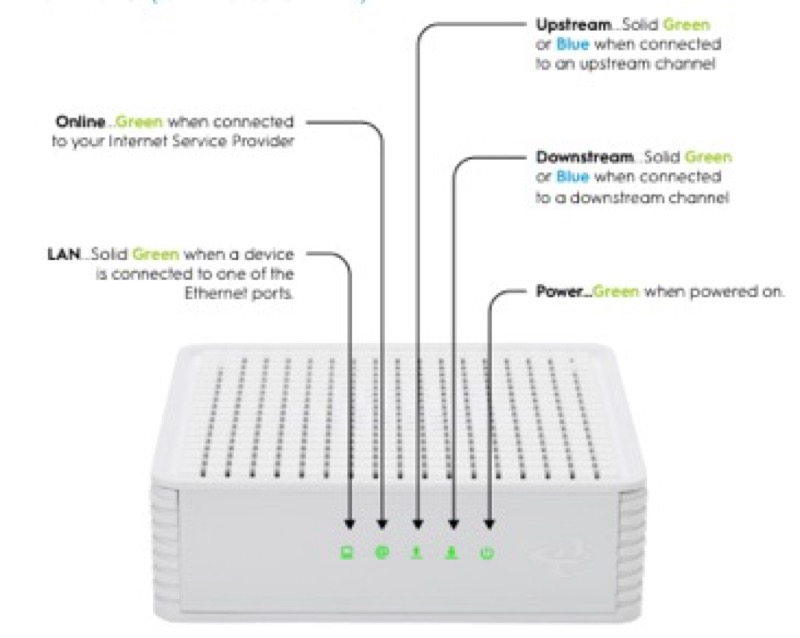
A red light means a fault or a warning on most of the devices the sources cover, but the red state is different on each one, so “why is it red” depends on the device and the pattern. On Spectrum’s WiFi 6 router (S02), a red pulse is a connectivity issue, red alternating with blue or green is a firmware update, and red alternating with white is overheating. On Cox’s XER10 (S31), solid red is no internet connectivity, from a hardware, software, Wi-Fi or Ethernet failure, or any impairment that results in the loss of IP connectivity. On Cox’s CGM4141 (S32), solid red is offline. On Verizon’s CR1000A (S08 and S09), several red states are listed, and the two sources disagree on which pattern means which.
So a red light has a reason, and the reason is set by the device and the pattern. The Spectrum reasons are the most specific: a connectivity issue, an update, or heat. The Cox reasons are about the connection and say no internet or offline. The Verizon reasons cannot be assigned to a single pattern from these sources.
Every reason on these devices points to the connection or the device’s own state, and the sources do not name one cause for any of them. So the first step is to check the cables, the modem and the outage picture, and then contact the provider.
#2 Why it is red, by device
| Device | Red pattern | Why, per the source |
|---|---|---|
| Spectrum WiFi 6 router | Red pulsing | Connectivity issue |
| Spectrum WiFi 6 router | Red and blue or green, alternating | Firmware update; the router restarts itself |
| Spectrum WiFi 6 router | Red and white, alternating | Overheating |
| Cox XER10 Panoramic router | Solid red | No internet connectivity |
| Cox CGM4141 gateway | Solid red | Offline |
| Verizon CR1000A | Red (several patterns) | Sources disagree on which pattern means which |
The table shows that Spectrum’s red is pattern-specific, Cox’s red is a connection state, and Verizon’s red is disputed in these sources.
#3 Steps when a red light shows
- Identify the device and the pattern. Read the label, then note whether the red pulses, alternates or stays solid.
- For a Spectrum pulse, check the connection. Check the cable from the modem and the modem’s own lights, and check for an outage.
- For a Spectrum alternation, wait or move the router. Blue or green alternating is an update, so wait. White alternating is overheating, so move the router.
- For a Cox solid red, verify the cables. Cox’s tables ask you to verify the cable connections and try resetting the gateway.
- Reboot once if the red continues. On the XER10, unplug the power cord from the back for 30 seconds. On Spectrum, press and hold the side Reset button for 4 to 14 seconds.
- For a Verizon red, do not interpret it alone. The sources disagree, so check the placement and cables and contact Verizon with the pattern.
- Contact the provider if the red stays. Give the model, the pattern, how long it has lasted, and what you have already checked.
#4 What If Scenarios
Q: Why is my Spectrum router red and pulsing if the internet seems to work? The Spectrum manual calls a red pulse a connectivity issue, so the connection may be unstable even while it works. Check the cable and modem, look for an outage, and contact Spectrum if it continues.
Q: Why is my Cox gateway solid red? On the XER10 it means no internet connectivity, and on the CGM4141 it means offline. Verify the cable connections and reboot the gateway as Cox’s table describes.
Q: Why is my Verizon light red? The Verizon sources disagree on which red pattern means which, so the sources do not give one reason. Check placement and cables, and contact Verizon with the exact pattern.
Q: Why is my red light alternating with white? On Spectrum’s manual, red and white alternating is overheating. Move the router to a cooler, open spot.
Q: My router is a different brand. Does this apply? Not as far as these sources show. Use that brand’s table or contact the provider.
#5 Related Articles
For the Spectrum red states, read the Spectrum router blinking red guide. For the Cox red state, read the Cox router red light guide. For the Verizon red states, read the Verizon router red light guide.