
#1 What This State Means
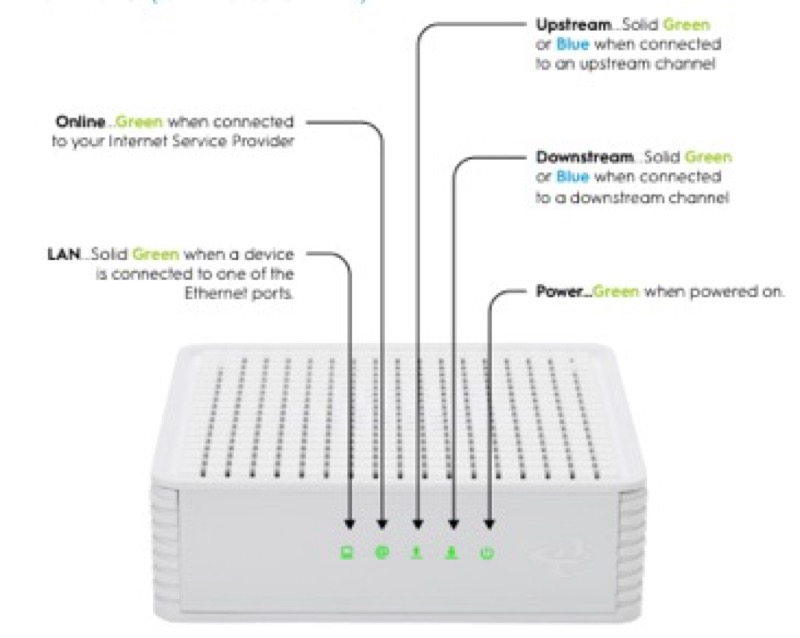
A blue light on a router is a working colour on some brands and a WPS state on others, so the answer to “why is it blue” depends on the device. On Spectrum’s WiFi 6 router (S02), blue is one of the working colours of the status light, and the pattern tells you the state: flashing is booting up, pulsing is connecting to the internet, and solid is connected. On Verizon’s CR1000A (S08), blue is the WPS colour: slow blinking blue is WPS pairing mode, for up to two minutes, and fast blinking blue is a successful WPS pairing. On Cox’s CGM4141 gateway (S32), flashing blue is WPS mode too, and Cox’s table gives it no action. The Cox XER10 (S31) and CGM4331 (S30) tables do not give blue.
So the “why” is the state the device is in. On Spectrum, blue is a start-up or connection state. On Verizon and Cox’s CGM4141, blue means a WPS pairing is running, which means someone pressed the WPS button or started pairing a device. A blue light is therefore usually a normal, expected state, and the check is whether you started the pairing.
This page covers Spectrum’s WiFi 6 router, the Verizon CR1000A and the Cox CGM4141. Other devices are not covered.
#2 Why it is blue, by device
| Device | Blue pattern | Why, per the source | What it needs |
|---|---|---|---|
| Spectrum WiFi 6 router | Flashing blue | Booting up | Wait for it to finish |
| Spectrum WiFi 6 router | Pulsing blue | Connecting to the internet | Give it time to settle |
| Spectrum WiFi 6 router | Solid blue | Connected to the internet | Nothing to fix |
| Verizon CR1000A | Slow blinking blue | WPS pairing mode, for up to two minutes | Finish pairing on the device |
| Verizon CR1000A | Fast blinking blue | WPS pairing successful | Wait for solid white |
| Cox CGM4141 gateway | Flashing blue | WPS mode | No action given |
The table keeps each device’s blue separate. The same colour is a start-up state on Spectrum and a pairing state on Verizon and Cox.
#3 Steps when a blue light shows
- Identify the device. Read the label. Spectrum, Verizon and Cox’s CGM4141 each read blue differently.
- Decide whether you started pairing. On Verizon and the CGM4141, blue follows a WPS press. If you did not press WPS, check your devices for one trying to join.
- For Spectrum, read the pattern. Flashing is booting, pulsing is connecting, and solid is connected.
- For Verizon, read the blink speed. Slow blinking is pairing, and fast blinking is success.
- Finish pairing if you are connecting a device. Complete the pairing on the device within the window.
- Change the Wi-Fi password if you cannot account for a pairing. That stops a device that joined without your permission from staying on the network.
- Contact the provider if the blue does not match its table. Give the model, the pattern and how long it has lasted.
#4 What If Scenarios
Q: Why is my router blue even though I did not press anything? On Spectrum, blue is a start-up or connection state, so it is normal while the router boots or connects. On Verizon or the Cox CGM4141, blue is WPS pairing, so check whether a device is trying to join, and change the Wi-Fi password if you cannot account for it.
Q: Why is my Verizon router blinking blue slowly? Verizon’s CR1000A guide gives slow blinking blue as WPS pairing mode, for up to two minutes. Finish pairing on your device in that time.
Q: Why did my Spectrum router turn solid blue? Solid blue on Spectrum means the router is connected to the internet, according to the manual.
Q: Why is my Cox gateway blue? On the CGM4141, flashing blue is WPS mode, with no action in Cox’s table. On the XER10 and CGM4331, the sources do not give blue, so contact Cox for that device.
Q: My router is a different brand or model. Does this apply? Not as far as these sources show. Use that brand’s table or contact the provider.
#5 Related Articles
For the Spectrum blue states, read the Spectrum router blinking blue guide. For the Verizon blue WPS states, read the Verizon router blinking blue guide. For the Cox blue WPS state, read the Cox router blinking blue guide.