
#1 What This State Means
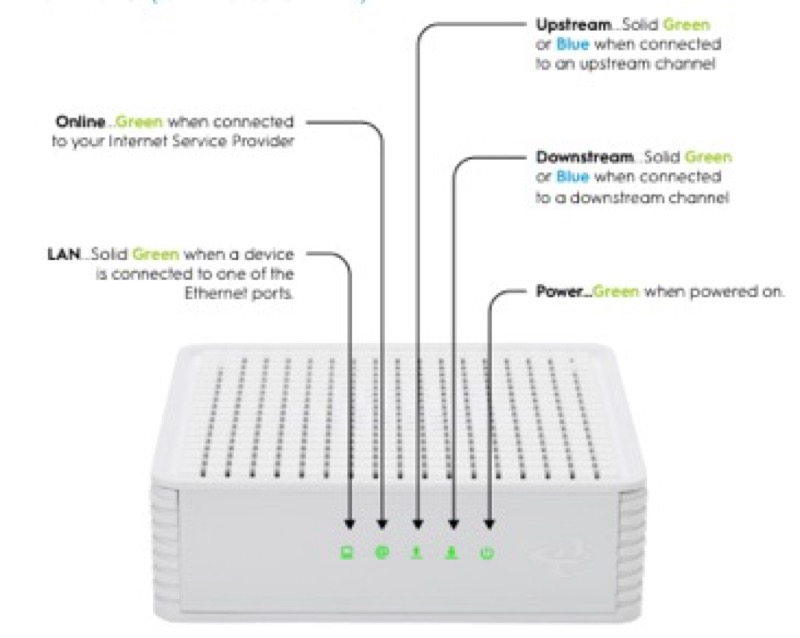
A router that blinks after a power outage is not showing a separate outage state. The sources on this site describe the states a router passes through when power returns, and they do not give a separate light for “after an outage”. So the lights after a power cut are the same start-up sequence the router runs on any boot, and the same colours and patterns apply. What changes is how long the router takes to finish and whether the modem and the network are back too.
Two brands are documented for this sequence. Spectrum’s WiFi 6 manual (S02) describes a flashing blue or green light while the router boots up, a pulsing light while it connects to the internet, and a solid light once it is connected. Cox’s XER10 table (S31) describes solid amber for the boot and flashing amber while the router acquires an IP address on the Ethernet WAN, and then solid white once it is online. In both cases the light is read against that brand’s table, and the end state is the steady one.
A power cut can also leave the modem restarting. The sources do not say how that affects the router’s connecting state, and neither gives a time for it, so this page checks the modem as a first step rather than assuming a cause.
#2 After a power cut, by brand
| Brand and device | Boot state | Connecting state | End state |
|---|---|---|---|
| Spectrum WiFi 6 router | Flashing blue or green | Pulsing blue or green, connecting to the internet | Solid blue or green, connected |
| Cox XER10 Panoramic router | Solid amber | Flashing amber, acquiring an IP address on the Ethernet WAN | Solid white, online |
For a red pulse on the Spectrum router, the manual names a connectivity issue, and for a solid red on the Cox XER10, the table says no internet connectivity. Either is a state to check on the connection, not part of the normal return after a cut.
#3 Steps after the power returns
- Wait for the boot state. Flashing blue or green on Spectrum, or solid amber on Cox, is the boot. Do not unplug the router while it boots.
- Wait for the connecting state to finish. A pulse on Spectrum or flashing amber on Cox is connecting. Give it time, since neither source gives a limit.
- Check the modem. A power cut can leave the modem restarting, so check that the modem has power and that its lights look normal.
- Check the cable. Make sure the cable from the modem into the router is firmly connected. Cox’s tables ask you to verify the cable connections for a connection problem.
- Check for an outage in your area. A power cut can be part of a wider outage, so check before you restart again.
- If the light turns red, check the connection. A red pulse on Spectrum is a connectivity issue, and solid red on Cox is no internet connectivity or offline. Reboot once if the red continues.
- Contact the provider if the light does not reach its end state. Give the model, the state the light stopped at, and how long it stayed there.
#4 What If Scenarios
Q: The router blinks blue after the power came back. Is that the outage? On Spectrum, blue is the boot and connecting sequence, not the outage. Flashing is booting, and pulsing is connecting. Give it time to reach solid blue or green.
Q: My Cox router is amber after the power cut. Is it broken? Not on Cox’s table. Solid amber is the boot state, and flashing amber is IP acquisition. Let the router finish, and check the modem if it does not reach solid white.
Q: Will the lights tell me the power cut caused a fault? The sources do not say a power cut causes any particular light. The lights show the boot and connecting states, so check the modem and the outage picture before you assume a fault.
Q: Do I need to reset the router after a power cut? No. The sources give no reset for a power cut. A restart keeps your settings, so use a restart only if the light does not settle, and a reset only if support asks.
Q: How long will the light blink after an outage? The sources do not give a time for the connecting state. Give it reasonable time, and contact the provider if it does not reach its end state.
#5 Related Articles
For the Spectrum blue states after an outage, read the Spectrum router blue light after a power outage guide. For the Cox boot states, read the Cox gateway lights by device guide. For the restart and reset difference, read restart or factory reset.