
#1 What This State Means
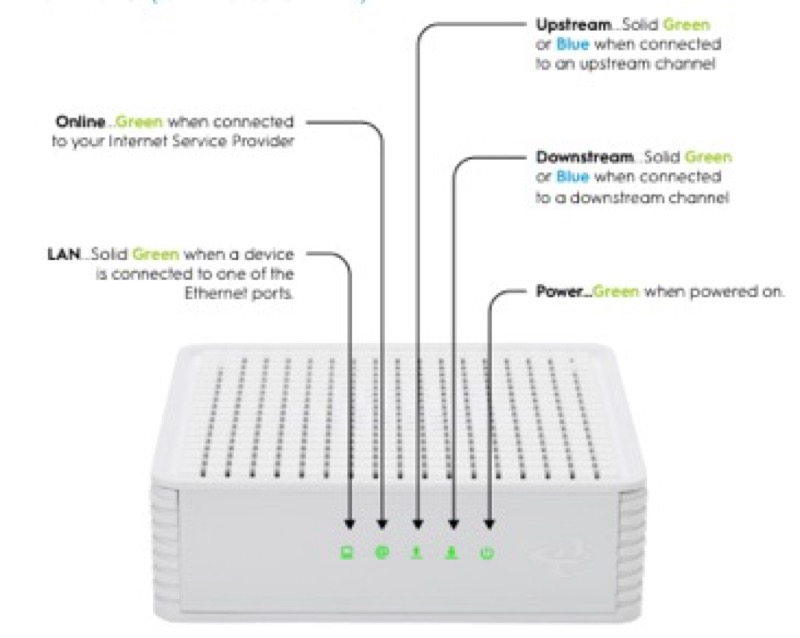
AT&T’s official guide to the All-Fi Hub BGW620 describes its lights in a separate legend, so the states on this page come from that guide. It covers a Service LED, an Ethernet LED for each port and a Power LED on the back. The guide’s Service LED states are different from the BGW320’s, and the hub has a blue state that the BGW320 guide does not describe.
The most useful states are these. Solid white means the hub is online. Pulsing white means it is powering up or starting up. Pulsing green, fast means it is connected and ready for activation, which AT&T says happens only during first installation. Solid red has two meanings: the hub is in a place that is causing it to overheat, or it has a hardware issue that needs replacement if a reboot does not fix it. Pulsing red, fast is a network service issue that may be momentary, and pulsing red, slow means the hub has no broadband connection.
The BGW620 also has states the BGW320 does not show. Pulsing amber, slow means the hub is getting an update. Pulsing blue, fast means your internet service is part of an outage, and the hub is trying to go into internet backup mode. Solid blue means the hub is in internet backup mode and will return to fibre internet when the outage is over. Check these three if the blue light worries you.
#2 Service LED states
| Service LED | What AT&T says it means | First step |
|---|---|---|
| Solid white | Online | Connect a device and enjoy |
| Pulsing white, slow | Powering up | Wait |
| Pulsing white, fast | Starting up | Wait for it to finish |
| Pulsing green, fast | Connected and ready for activation, first installation only | Finish activation |
| Solid red | Overheating in its location, or a hardware issue | Move it to a flat surface with air around it, or reboot once and replace if the fault stays |
| Pulsing red, fast | Network service issue, which may be momentary | Check for an outage, then reboot |
| Pulsing red, slow | No broadband connection | Check the cable, then follow AT&T support for the reset step |
| Pulsing amber, slow | Getting an update | Wait until it turns solid white |
| Pulsing yellow, fast | Phone registration failed, or a VoIP line has a problem | Check the phone service |
| Solid yellow | A VoIP line is registered, or a call is in progress | None |
| Pulsing blue, fast | Part of an outage, trying to enter internet backup mode | Wait; check for an outage |
| Solid blue | In internet backup mode | Service returns to fibre when the outage ends |
#3 Ethernet and Power LEDs
A solid green Ethernet LED means the port has a link to a connected device. If it is off, the device is not properly connected or is not powered on. A solid green Power LED, on the back, means the hub is powered on. No light means the power is not connected or there is no power at the wall plug. AT&T’s guide also says that if the front Service LED is off but the Power LED is green, the hub needs to be replaced.
#4 Steps to Troubleshoot
- Read the front Service LED first. Note its colour, whether it pulses fast or slow, and whether it is solid.
- For solid blue, check whether there is an outage. AT&T’s guide says the hub is in internet backup mode and returns to fibre service when the outage ends. Check for an outage in your area.
- For pulsing blue, wait. The hub is trying to enter backup mode because of an outage. Check the outage tools, then watch the light.
- For pulsing red, fast, check for an outage and reboot. Use Smart Home Manager or myAT&T on a mobile device to look for a service problem in your area.
- For pulsing red, slow, check the cable first. Look for a loose, disconnected or damaged cable at the wall and at the hub. AT&T’s guide asks you to press and hold the red reset button for this state, but AT&T’s documents disagree on the duration, so use AT&T’s current support instructions for that step.
- For solid red, check the environment. If the hub is overheating, move it to a flat surface with space around it. If the light stays red after a reboot, AT&T’s guide says the hub needs replacement.
- Let start-up finish before you unplug anything. AT&T’s BGW210 guide warns that unplugging during power-up can damage a gateway. The BGW620 guide does not repeat that warning, so treat it as general advice.
- Contact AT&T if the light does not match the guide. Give the model, the front and back light states, and what you have already checked.
#5 What If Scenarios
Q: The blue light is on and the internet works. Is the hub broken? Not necessarily. AT&T’s guide describes solid blue as internet backup mode, which means the hub has switched to a backup connection during an outage. Check for an outage. The hub returns to fibre service when the outage is over.
Q: The blue light is blinking. Should I restart? AT&T’s guide describes pulsing blue, fast as the hub trying to enter backup mode during an outage. Check for an outage first. The guide asks you to check the outage tools for this state, and it does not ask for a restart.
Q: The hub is solid red. Is it the same as the BGW320? The red states are similar. Solid red can mean overheating or a hardware issue, and AT&T’s guide gives the same two checks. Move the hub if it is overheating, and contact AT&T if it is a hardware fault.
Q: The power light is off and the Service light is also off. What now? AT&T’s guide says no power light means the power is not connected or there is no power at the wall plug. Check the cord and outlet first.
Q: Can I reset the hub to clear a red light? Only with AT&T’s current support instructions. The guide mentions pressing and holding the red reset button for pulsing red, slow, but AT&T’s documents disagree on the duration, so this page gives no number. A reset removes your Wi-Fi settings, so do not reset until the simpler checks have failed.
#6 Related Articles
For the BGW320 light legend, read the AT&T BGW320 light meanings guide. For the blinking red states on AT&T gateways, read the AT&T router blinking red guide. For the blue light on AT&T gateways, read the AT&T router blinking blue guide.